Right in Messages

Your next tee time is just a text away

Say when you want to play. TeeBot7 finds the open times and texts you when one opens up, right in Messages. No app to download.

Free · Works in Messages, Messenger, Instagram & text.

4,900+ courses 0 apps to download $0 to start

A chat with TeeBot7 that opens: Hi there! I'm TEEBOT7. I'm an AI bot that searches for tee times. If I don't find a time right away, I'll monitor the tee sheets and DM you when something opens up. First, where do you play? Just send me a city or ZIP code - for example, Pasadena CA or 91103.

See it work

Four ways TeeBot7 gets you on the course

Real chats in Messages, sped up.

Quick search

Pick a course, a day, a time and your players. Open times come back in seconds.

Alerts when a time opens

Sold out? TeeBot7 keeps watching the tee sheet and messages you the moment a time opens up. No more refreshing.

Multi-Search

Tick the courses you play and search them all at once, or save them to search again. Two courses free, up to ten with Premium.

Weekly repeat

Play the same time every week? With Premium, your alert renews itself every week.

What you actually get

Two messages, and you're on the course

No dashboard to check, no feed to scroll. TeeBot7 finds the times and hands you the booking link in the same thread.

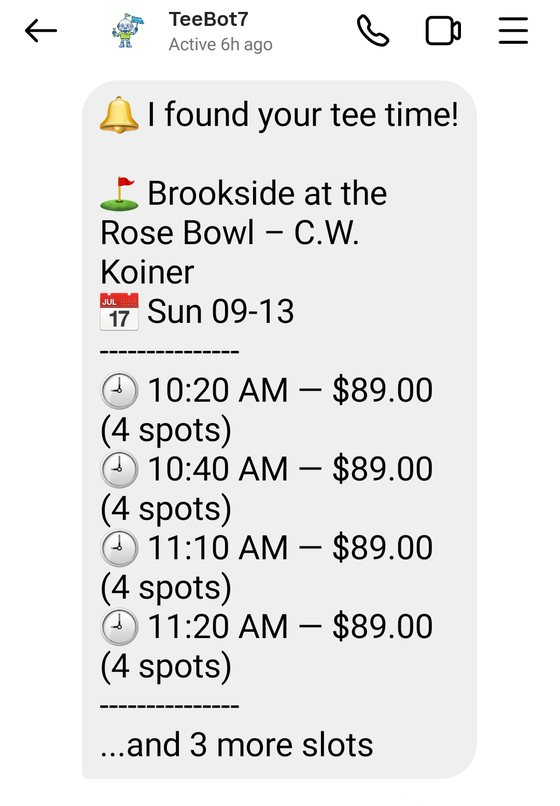
TeeBot7 alert listing four available tee times at Brookside at the Rose Bowl with prices and spots remaining.

The alert

Course, date, every open time, the price and how many spots are left. Nothing to tap through to find out.

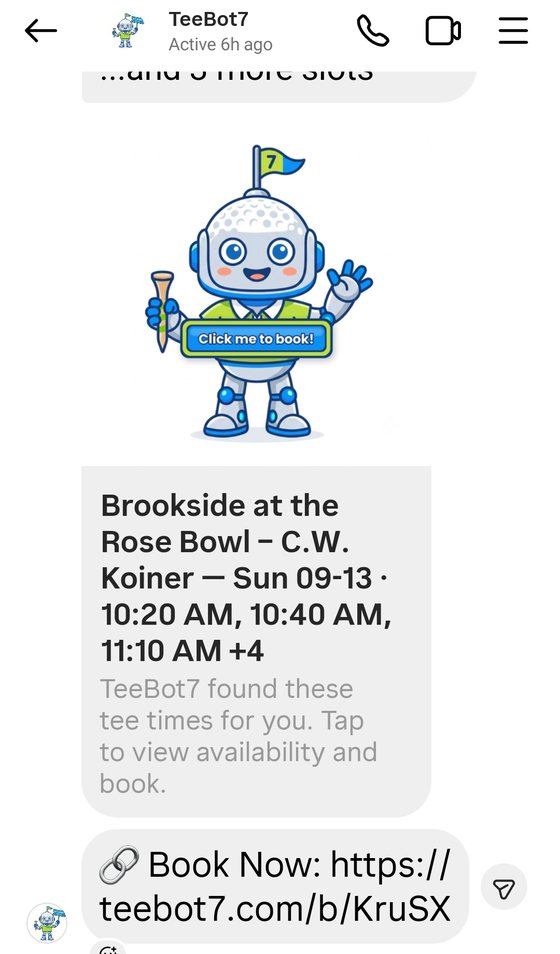
TeeBot7 follows the alert with a booking card and a Book Now link to teebot7.com.

The booking link

A convenient booking link, ready to tap, so you can lock the time in without hunting for it. TeeBot7 never takes payment and doesn't keep your private information.

How it works

Simple chat messages do everything

No app, no account, no forms. If you can text a friend, you can use TeeBot7.

1

Say hello

Text TeeBot7 from the Messages app on your iPhone, or Messenger, Instagram or SMS on any phone. Nothing to download and nothing to sign up for.

2

Just follow the prompts

TeeBot7 will guide you and prompt you along the way for answers.

3

Get your times

Searches come back in seconds. Want it watched instead? Say so, and TeeBot7 keeps checking and messages you when something opens up.

Why golfers stick with it

Built for ease of use and speed

Just like chatting with a friend

Plain messages in plain English. There is no interface to learn.

Nothing to download

It works right in Messages, or the other messaging apps already on your phone.

Very fast searches

Live tee sheets come back in seconds, not minutes.

Several courses at once

Check a whole shortlist in one message instead of one at a time.

Weekly auto-repeat

Set your regular game once and it runs again every week. Premium.

Pricing

Free to use. Only $10/mo when you want more.

Both tiers work on every platform TeeBot7 supports.

Free Tier

Free/forever
  • 2 Active Jobs
  • 2 Favorite Courses
  • Standard notifications
  • All Platforms Supported
Start Free
Most Popular

Premium

$10/mo
  • 10 Active Real-Time Searches
  • 10 Favorite Courses
  • Priority Alerts
  • Weekly Auto-Repeat Jobs
Get Premium

Start a chat, then send upgrade. Subscribing from inside the chat is what ties the payment to your account.

Questions

Frequently asked

Does TeeBot7 book the tee time for me? +
No, TeeBot7 only searches for tee times in your selected area. We provide you with a booking link so you can book yourself. We never touch your private data.
Why did I click a tee time link and it was already gone? +
Tee times book fast. TeeBot7 sends users notification of available tee times when they appear on our servers. Premium users receive priority notifications.
Will TeeBot7 recognize me on different messaging platforms? +
Yes — you just link them once. Send link on the platform you already use and TeeBot7 replies with a 4-digit code that is good for 10 minutes. Send link 1234 (using your code) on the other platform, and the two are joined. From then on they share your Premium status, your favorite courses and your saved location.
How do I reset my settings? +
Send reset (or restart) to the bot. That clears your saved location, your name and your favorite courses, then restarts the quick onboarding so you can enter them again. Your Premium subscription is kept. One thing to know: resetting also cancels any active monitoring jobs, so you will need to set those up again.
What if I want to search tee times at a course, but don't know its city or zip? +
Just send the course name on its own — for example, Wilson GC. TeeBot7 searches all 4,900+ courses across America to find it, then sets your area to that course, so every course near it comes along too. You will see Location set to Wilson GC, Los Angeles, CA and a Menu button. When you are ready to search, add a day and a time — Wilson GC saturday morning.

Get in touch

Missing a course, or need a hand?

Missing a Course?

TeeBot7 supports thousands of courses. If your favorite local track isn't showing up, let us know and we'll add it to the radar.

Contact the Team